
It's a rite of passage of every student that completes our software rendering module to start asking questions and exploring the topic of SIMD (Single Instruction, Multiple Data).
Today we have AVX-512, NEON, SVE, and GPUs with thousands of cores. These modern CPUs & extensions are the result of years of exploration, learning, market pressure, and they all bring with them a lot of history/retro-compatibility noise. As always, I like to look back and discuss different technologies by analyzing what was happening when they were just starting out. Back in the late 90s, many programmers were learning how to squeeze a few extra frames per second out of a Pentium MMX using hand-writing assembly for the first time.
Let's travel back to 1997 and see what programming MMX looked like!
What was MMX?
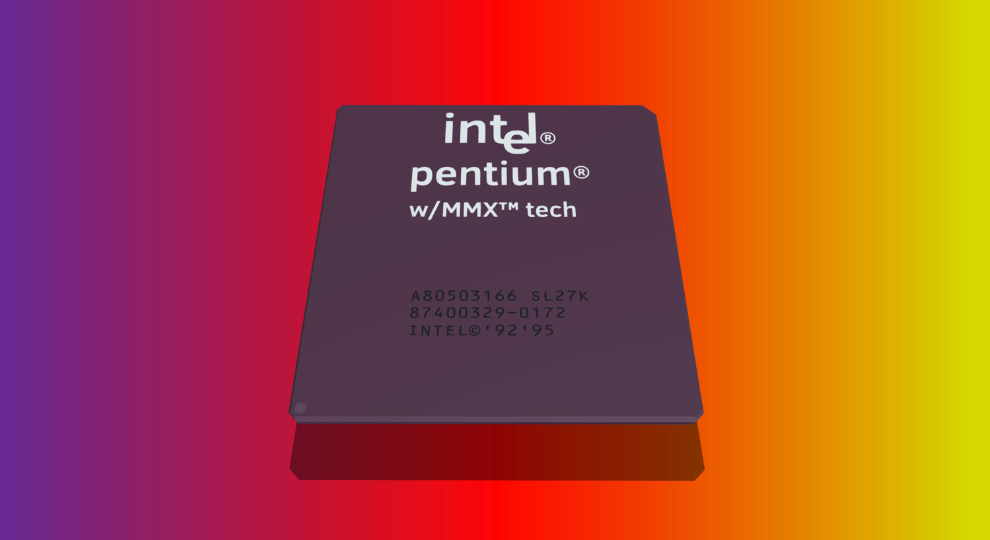
MMX (MultiMedia eXtensions) was introduced with the Pentium MMX processor in 1997 for improved multimedia experience, including graphics, digital signal processing, audio, and modem software.
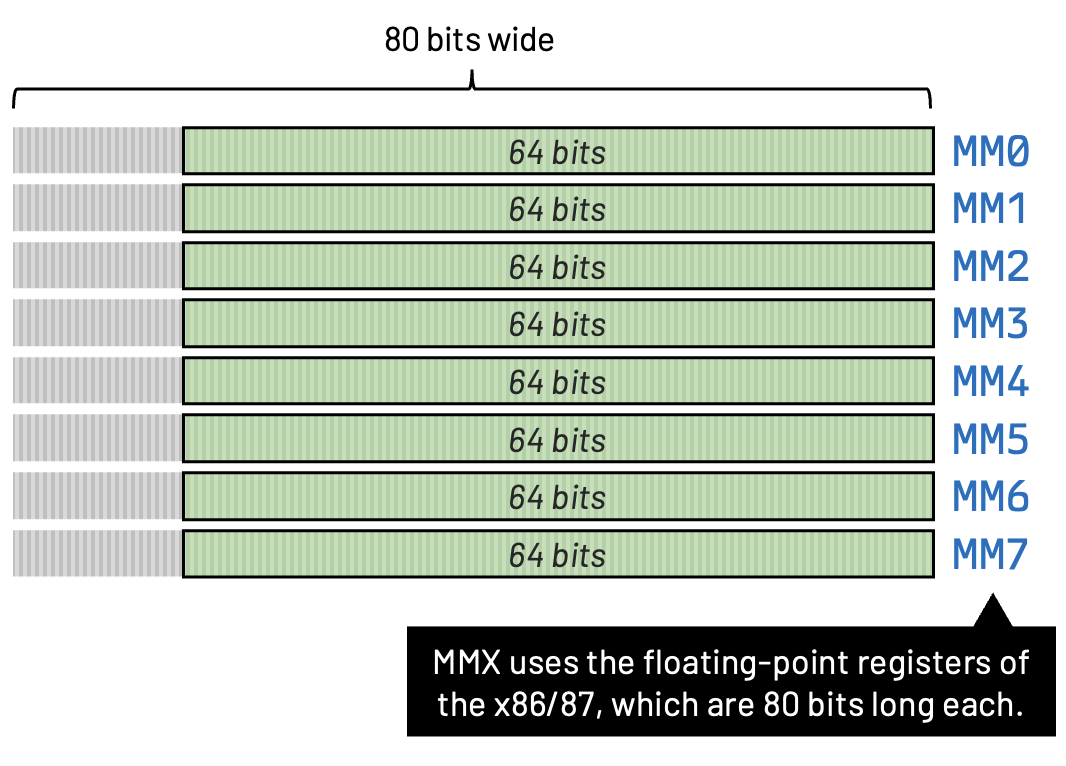
It was a set of 57 additional instructions built into the Pentium chip for enhanced performance. The CPU had to be switched into MMX mode, which turned the first 64 bits of the x86 eight 80-bit floating point registers into MMX registers.
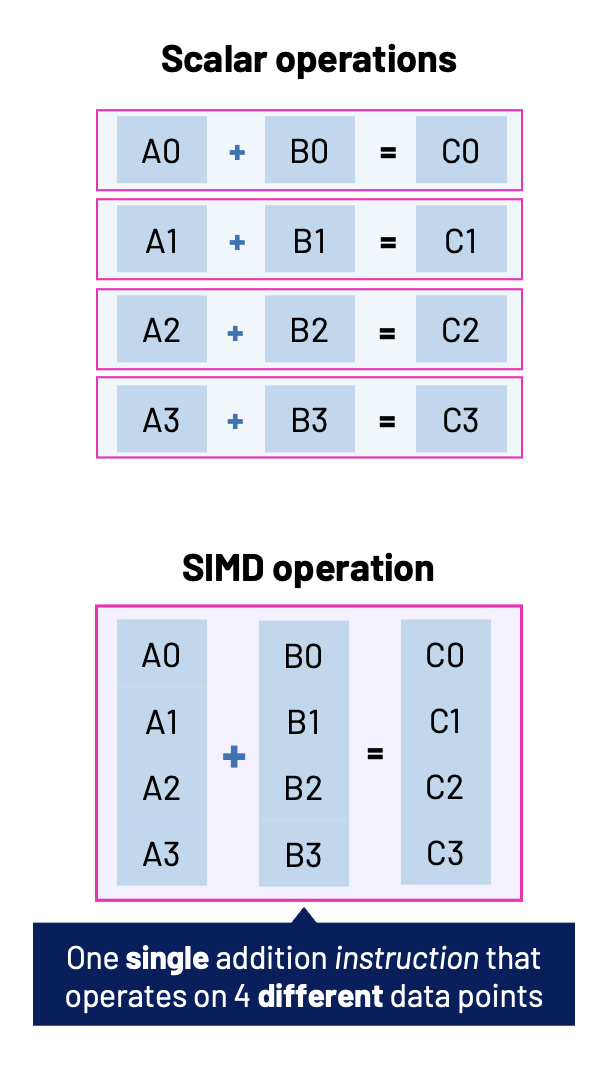
The idea motivating the creation and the use of MMX was simple: instead of processing one integer at a time, the CPU processes several integers packed inside a single 64-bit register simultaneously.
For multimedia software (image processing, audio mixing, video playback, and even games) this could provide significant speedups.
For example, instead of adding eight bytes individually:
10 + 20
30 + 40
50 + 60
70 + 80
...
MMX lets us perform all eight additions with a single instruction.
That's parallelism! And that's the main idea behind SIMD.
What is SIMD?
"Single Instruction, Multiple Data" is a type of parallel processing technique. It describes computers with multiple processing elements that perform the same operation on multiple data points simultaneously.
SIMD can be internal (part of the hardware design) and it can be directly accessible through an instruction set architecture (ISA). In the case of the MMX, Intel extended their x86 instruction set to include the new SIMD instructions.
Was MMX the First SIMD?
No, MMX was definitely not the first SIMD, although it was hugely important in making SIMD mainstream on x86 PCs.
We must remember that many advances and innovations in computer technology predates the personal computer era. SIMD is no different, and it predates Intel's MMX by decades. The general idea of using one instruction operating on multiple data elements goes back much further than the Pentium.
One famous early example is the ILLIAC IV supercomputer project from the 60s. The ILLIAC IV was the first massively parallel computer. The system was originally designed to have 256 64-bit floating-point units (FPUs) and four central processing units (CPUs) able to process 1 billion operations per second.
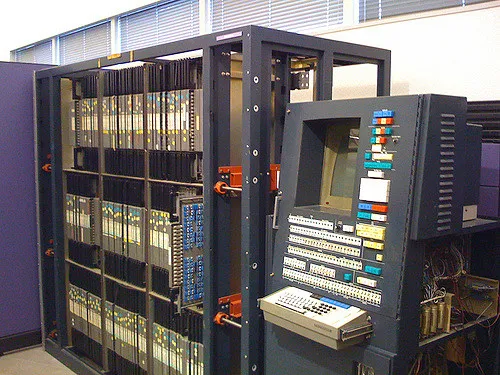
In summary, the ILLIAC IV used a large number of processing elements operating under a single instruction stream, making it an important ancestor of modern SIMD/vector architectures.
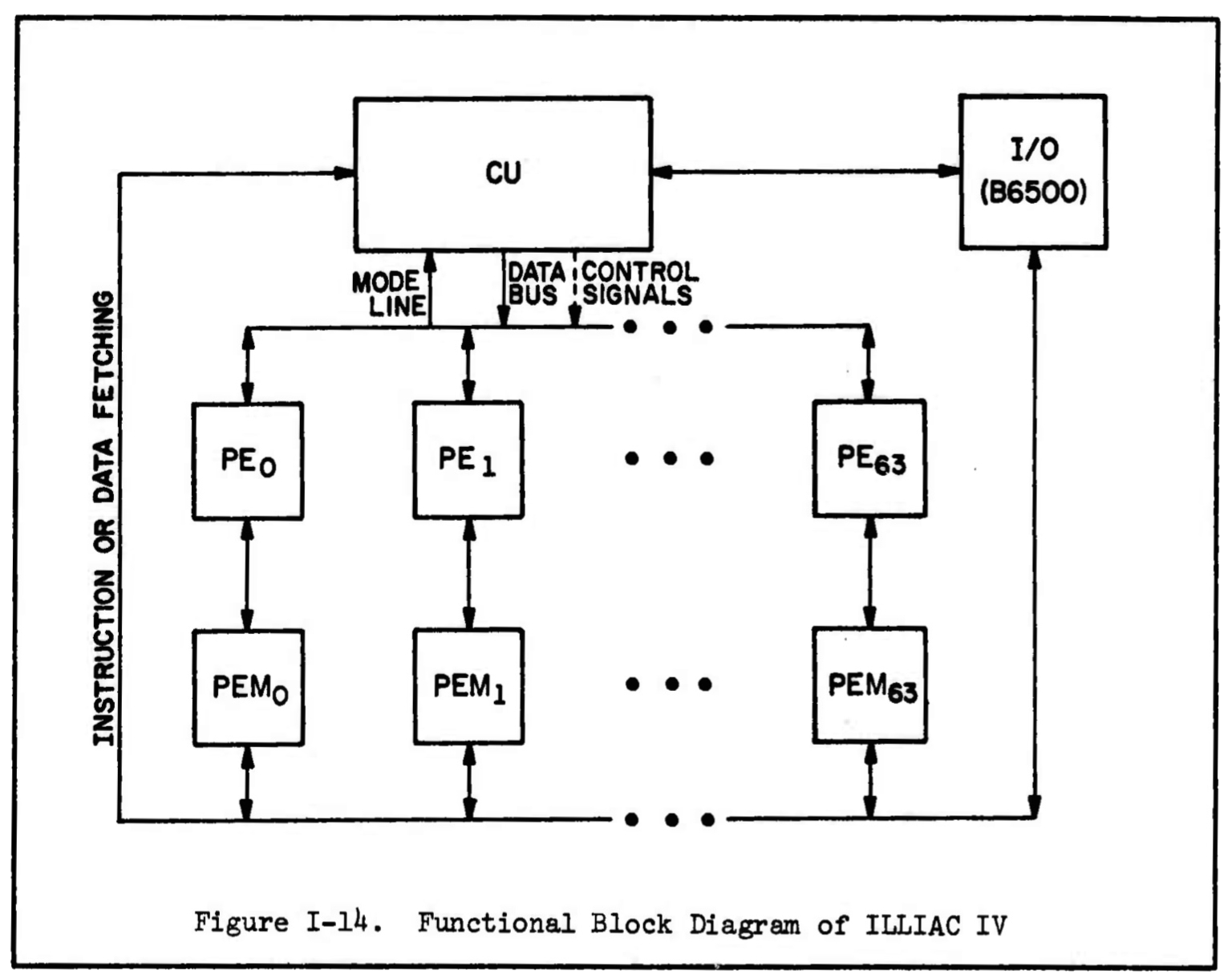
There were also array-processing machines from companies such as CDC, Cray, and others throughout the 60s and 80s.
SIMD vs Array Processors
It's important to point out that Vector Processing and SIMD are not quite the same thing. The distinction is mostly about how the multiple data elements are presented to the processor and how the hardware executes them.
SIMD operations are fundamentally tied to the width of the registers.
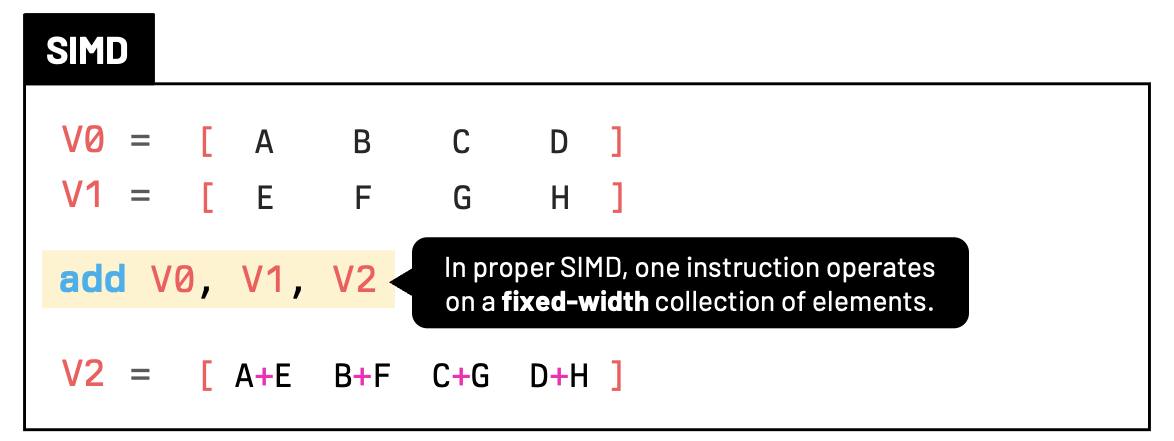
The Cray-1 from 1976 was characterized by being a vector processor. It had eight 64-element vector registers, each holding 64-bit values.
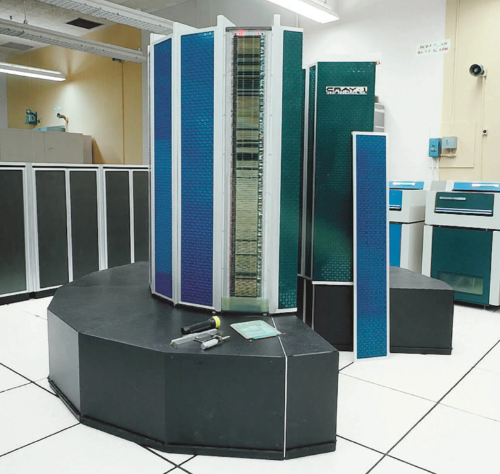
Similar to what we saw with SIMD, the Cray-1 did not require 64 separate ADD instructions. So, given that this is obviously SIMD-like, why don't we simply call it SIMD? Because of an architectural distinction. SIMD operates on fixed-width registers, while the vector register in the Cray-1 was more like a container for a sequence.
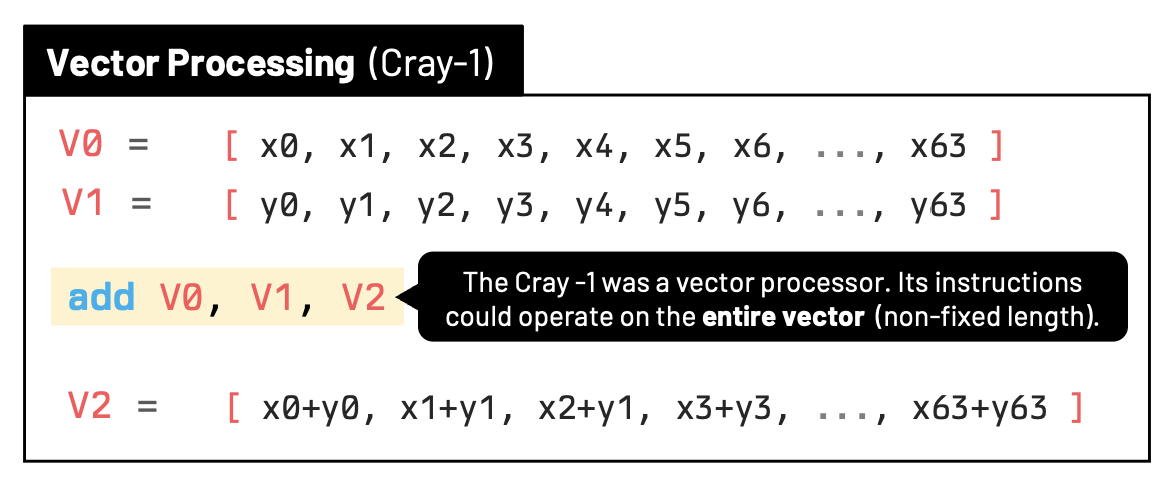
Vector processors are usually characterized by the presence of a SET VECTOR SIZE instruction. This vector functional unit can process the elements over multiple cycles.
The Cray-1 had a VL (vector length) register and instructions that could set that length. The vector functional units then processed that many elements over multiple cycles. All the remaining extra elements of the array were simply not used/cycled.
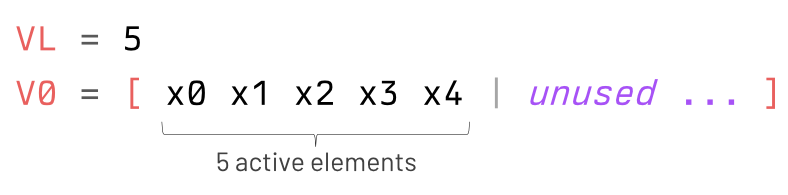
The VL register of the Cray-1 was 7 bits, even though the architecture only used values up to 64 (2⁶), given that Cray-1 vector registers contained up to 64 elements. Also, a small detail that is worth mentioning is the fact that the Cray-1 interpreted VL=0 as 64, processing all the 64 elements of the vector register.
MMX's Real Significance
So, as you can see, SIMD was not invented by Intel. Its real significance was putting a relatively accessible SIMD instruction set into mainstream x86 PCs. That was the first time most of us (personal computer enthusiasts) were able to get our hands dirty with this type of technology, and that is why MMX gets so much attention in retro-computing discussions. It wasn't the invention of SIMD, but it was one of the moments when SIMD crossed over from specialized/high-performance computing into ordinary desktop software development.MMX Registers
As we saw before, one clever design decision was that Intel didn't add a brand-new register file. Instead, MMX re-used the floating-point stack registers.
MM0
MM1
MM2
MM3
MM4
MM5
MM6
MM7
Each MMX register is 64 bits wide. Internally, the MMX registers were aliases of the x87 floating-point registers. These underlying floating-point registers were 80 bits long, but MMX accessed only the lower 64 bits.
This decision saved silicon, but it also created an important limitation:
It also created an important rule:
Don't worry... we'll come back and talk more about these limitations very soon.
Packed Integer Data
A single MMX register could hold different layouts:
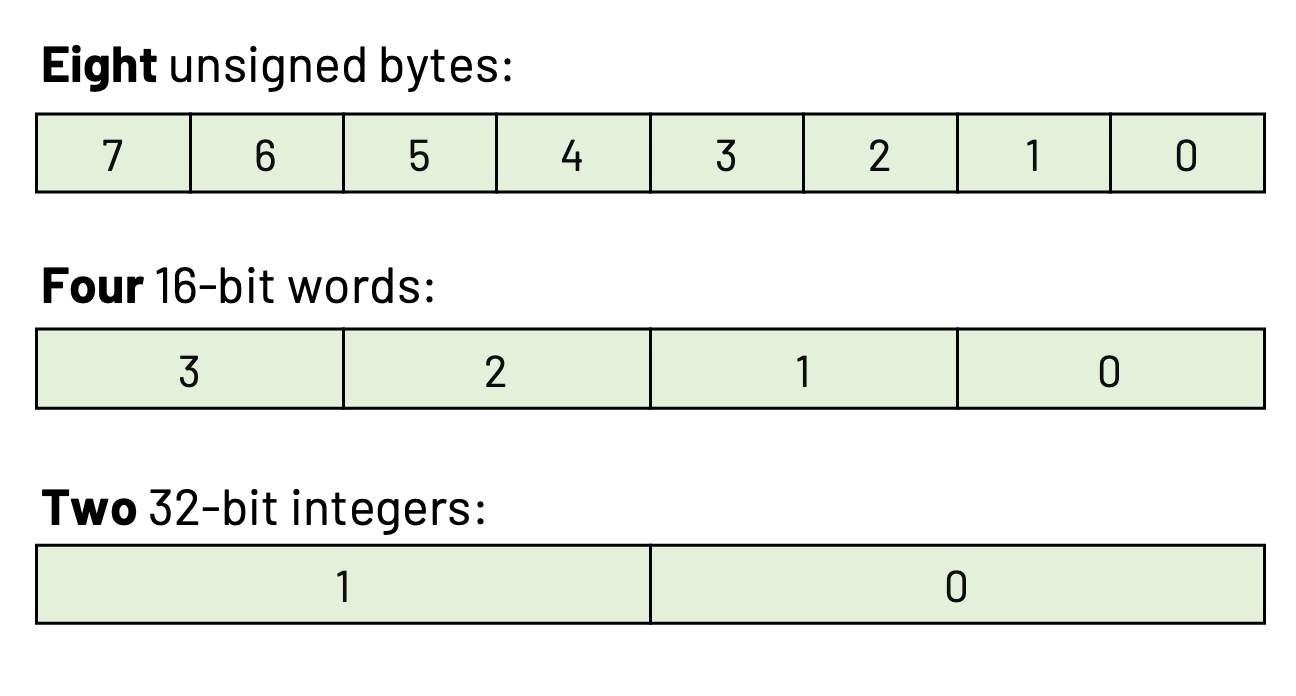
The same register could represent any of these layouts depending on the instruction you used.
Your First MMX Program
Suppose we want to add 8 pixels together (assuming no compiler optimization):
for (int i = 0; i < 8; i++) {
  dest[i] = src1[i] + src2[i];
}
An MMX version would look like:
movq  mm0, [src1]  ; loads eight bytes
movq  mm1, [src2]  ; loads eight bytes
paddb mm0, mm1     ; performs eight byte additions simultaneously
movq  [dst], mm0   ; store the result
One instruction replaced eight separate additions!
Saturating Arithmetic with MMX
Another really great feature of MMX was its ability to perform "saturating" arithmetic.
When we add two values together, normal integer arithmetic wraps around.
250 + 20 // = 270, which wraps around to 14The above addition exceeds 255 and will normally wrap around to 14.
This 'wrap around' nature of integer arithmetic can be cumbersome to deal with, especially when working with graphics. If we are adding pixel values together, we want maximum brightness to stay maximum brightness!
MMX provides saturation for cases like this. The instruction is simply:
paddusb mm0, mm1
The us stands for unsigned saturation, and clamps the maximum result value to 255.
250 + 20 // = 255Likewise:
10 - 40 // = 0This made brightness adjustments and blending operations much simpler.
Comparing Pixels with MMX
It's natural to think of MMX's power applied to graphics and other multimedia tasks. For example, let's suppose we want to create a mask where every value greater than another becomes white.
MMX offers comparison instructions:
pcmpgtb mm0, mm1Each byte becomes either 0xFF or 0x00.
These masks are useful when implementing threshold filters, sprite transparency, or collision logic.
Shifting Packed Values with MMX
If you ever took a course with us, you know how often we use bitshifting to multiply & divide values by 2. Given how expensive multiplication and (especially) division instructions were in older CPUs, shifting bits left & right was a faster way of multiplying and dividing values by powers of 2.
MMX offers a way of shifting packed values simultaneously:
psllw mm0, 1  ; multiply every 16-bit value by two
psrlw mm0, 1  ; divide by two
Again, all packed values are shifted at the same time!
Multiplication with MMX
Need to multiply packed values by something other than 2? Not a problem. MMX also supports packed multiplication.
pmullw mm0, mm1Each pair of 16-bit integers is multiplied independently. This became useful for:
- Audio volume scaling
- Image convolution
- Color transformations
- Fixed-point math
Remember how one of the big aspects of MMX was that it "took over" the floating-point registers of the x87? That means there was no floating-point SIMD with MMX, so MMX programs relied heavily on fixed-point arithmetic. Real floating-point SIMD for Intel x86 CPUs didn't arrive until SSE (Streaming SIMD Extensions) several years later with the Pentium III series.
The Full MMX Instruction Set
The 57 instructions introduced by MMX:
| Description | Instructions |
|---|---|
| Addition of packed integers | PADDB, PADDW, PADDD, PADDSB, PADDSW, PADDUSB, PADDUSW |
| Subtraction of packed integers | PSUBB, PSUBW, PSUBD, PSUBSB, PSUBSW, PSUBUSB, PSUBUSW |
| Comparison of packed integers | PCMPEQB, PCMPEQW, PCMPEQD, PCMPGTB, PCMPGTW, PCMPGTD |
| Multiplication of packed integers | PMULLW, PMULHW, PMADDWD |
| Packing of packed integers | PACKSSWB, PACKSSDW, PACKUSWB |
| Unpacking and interleaving packed integers | PUNPCKHBW, PUNPCKHWD, PUNPCKHDQ, PUNPCKLBW, PUNPCKLWD, PUNPCKLDQ |
| Logical operations | PAND, PANDN, POR, PXOR |
| Bit shifting | PSLLW, PSLLD, PSLLQ, PSRLW, PSRLD, PSRLQ, PSRAW, PSRAD |
| Moving data between MMX registers, general-purpose registers, and memory | MOVD, MOVQ |
| Switching between MMX and x87 FPU state | EMMS |
As seen above, the MMX instrucion set uses prefixes & suffixes for:
B: bytesW: wordsD: double-wordsQ: quad-wordsH: high orderP: packedUNPCK: unpack
The original MMX instruction set does not include the instructions PADDQ or PCMEQQ (for quad-words). These instructions were introduced by later SIMD extensions. The original 57 MMX instructions operate on packed 8, 16, and 32-bit integers. Its 64-bit operations such as PSLLQ and PSRLQ treat the entire MMX register as a 64-bit bit pattern rather than performing 64-bit integer arithmetic.
A Practical Example
Let's say you are responsible for writing a small routine to brighten an image. In this image, every pixel is one byte long. Without MMX, our code might look something like this:
int intensity = 20;
for (int i = 0; i < WIDTH * HEIGHT; i++) {
  pixels[i] += intensity;
  if (pixels[i] > 255) {
    pixels[i] = 255;
  }
}
Using MMX, the iterations over chunks of pixels would look something like:
section .data
    ; we put 8 bytes in memory with the value 20 (or 0x14 in hex)
    intensity: times 8 db 20 ; 14 14 14 14 14 14 14 14

section .text
    ; esi = pointer to pixels
    ; ecx = number of 8-pixel chunks

loop:
    movq    mm0, [esi]          ; load 8 pixels
    movq    mm1, [intensity]    ; load eight 20s
    paddusb mm0, mm1            ; saturated addition
    movq    [esi], mm0          ; store 8 pixels

    add     esi, 8              ; next 8 pixels
    dec     ecx
    jnz     loop

    emms                        ; leave MMX state
With MMX, eight pixels are processed at once. This was exactly the sort of optimization that graphics libraries loved.
The EMMS Instruction
As we just learned, MMX "borrowed" the floating-point registers from the original x86 architecture.
That means when you're finished using MMX, you must tell the CPU that you're done.
emmsThis clears the MMX state and allows x87 floating-point instructions to work correctly again.
If we forget to call EMMS, strange floating-point bugs may appear later in the program.
Trust me, every programming trying coding with MMX learned this lesson sooner or later.
Did Games use MMX?
Weirdly enough, not as many as you would think. Besides MMX being limited, you have to remember that MMX was released right around the time GPUs and 3D hardware acceleration cards (like S3 ViRGE, ATI 3D Rage, and 3dfx Voodoo) were entering the PC market. So, by the time MMX arrived, dedicated 3D hardware was already beginning to take over workloads that might otherwise have benefited from CPU-side optimizations.
That being said, during the late DOS and early Windows 95 era, CPUs were often the bottleneck for non-accelerated games.
MMX found its way into routines such as:
- Software texture mapping
- Sprite composition
- Alpha blending
- Image scaling
- MP3 decoding
- Modem software
- MPEG video playback
- Audio mixing
Kyle Freeman, the main programmer behind Novalogic's Comanche 3, often mentions how the game made heavy use of MMX instructions for both audio & graphics.
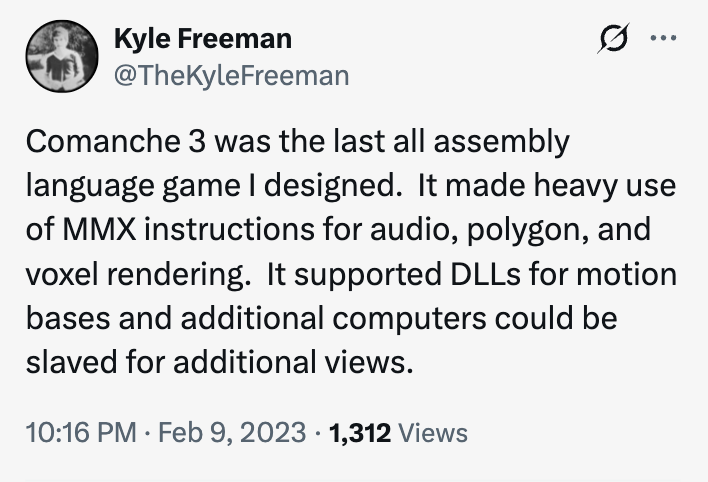
Examples of games that either required or benefited from MMX enhancements in their software renderer were Eraser Turnabout, POD, and Extreme Assault. I have read rumors of a Tomb Raider patch that added MMX enhancements to the game for lighting and textures, but I personally never saw any reliable source to confirm this version existed. Let me know if you do!
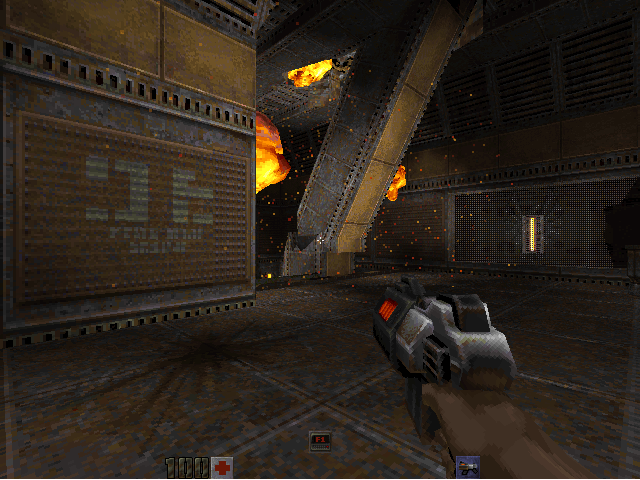
Even though Quake and Quake II are often used as examples of games that benefited from MMX technology, it's important to point out that Quake's famous software renderer predates MMX. The original Quake was released in 1996, while Intel introduced the Pentium MMX in 1997. So, Quake's fast performance was achieved primarily through techniques like register allocation, loop optimization, lookup tables, and hand-written x86; not by relying on MMX.
As we'll discuss soon, not many games actually used MMX. But the aplications that did, shipped with optional MMX code paths that were selected if the CPU supported the new instructions. Of course, developers usually maintained a non-MMX version as well, since millions of users still owned older Pentium processors.
Detecting MMX Support
Software could not simply assume MMX was available. The common approach was to use the CPUID instruction.
CPUID is an x86 CPU instruction used to ask the processor what it supports and to retrieve information about the CPU.
mov eax, 1
cpuid               ; retrieve information about the CPU
test edx, 1 << 23   ; bit 23 of EDX indicates MMX support
jz NoMMX            ; if zero, jump to routine to handle absence of MMX
Bit 23 of the EDX register indicates MMX support. If the bit is set, the program can safely execute MMX instructions. Otherwise, it should fall back to a scalar (non-MMX) implementation.
Other bits in EDX will tell us about different supported technologies. For example:
- Bit 23: MMX support
- Bit 25: SSE support
- Bit 26: SSE2 support
What About AMD's 3DNow!
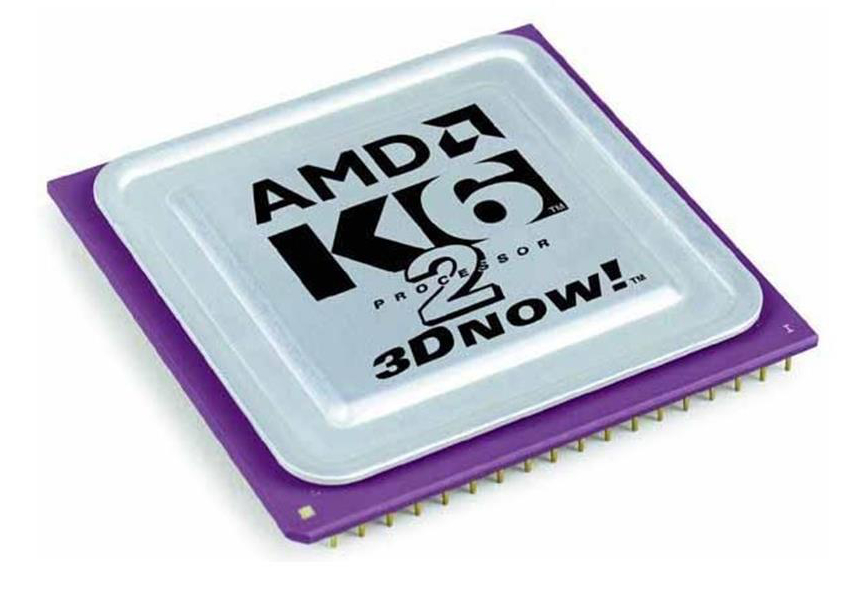
Years later, Quake II added support for a technology called 3DNow!. 3DNow! was designed by AMD and it was conceptually similar to MMX; it adds SIMD instructions to the base x86 instruction set, enabling floating-point SIMD operations using vector registers.
3DNow! also used 64-bit MMX registers, but it added instructions oriented toward floating-point SIMD. The first processor to ship with 3DNow! technology was the AMD K6-2 from 1998.
The source code of Quake II 3.19 was released in 2001 by Id Software under a GPL licence. Just keep in mind that the 3DNow! code was not part of that original 3.19 source release. Instead, AMD/id Software distributed a separate 3DNow!-optimized Quake II v3.20 build. Of course, these were distributed as pre-compiled binaries (without source code).
Was the 3DNow! a Success?
No. Even though a few popular games added 3DNow! enhancements, 3DNow! was never more popular than MMX. In fact, MMX was substantially more widespread because it had a huge head start. Intel introduced MMX with the Pentium MMX in January 1997, while AMD's 3DNow! arrived with the K6-2 in 1998.
More importantly, Intel had an enormous share of the x86 market, so choosing MMX meant potentially supporting a larger fraction of PC gamers. At the end of the day, 3DNow! was an AMD-specific extension.
Developers faced the choice of supporting either Intel CPUs or AMD CPUs. If you wrote a 3DNow!-optimized renderer, it would only benefit AMD chips that supported it. Meanwhile, MMX was supported by Intel and subsequently by AMD, Cyrix, and others.
Finally, the ultimate blow to AMD's 3DNow! was Intel's introduction of SSE (Streaming SIMD Extensions) with the Pentium III in 1999.
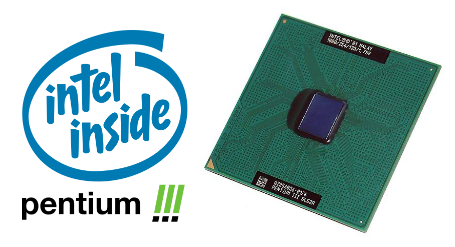
SSE: Streaming SIMD Extensions
Intel's SSE was a major turning point for both 3DNow! and MMX, but it didn't immediately kill MMX.
SSE technology introduced both scalar and packed floating-point instructions, which basically removed the old MMX limitation of not allowing floating-point code and SIMD to coexist.
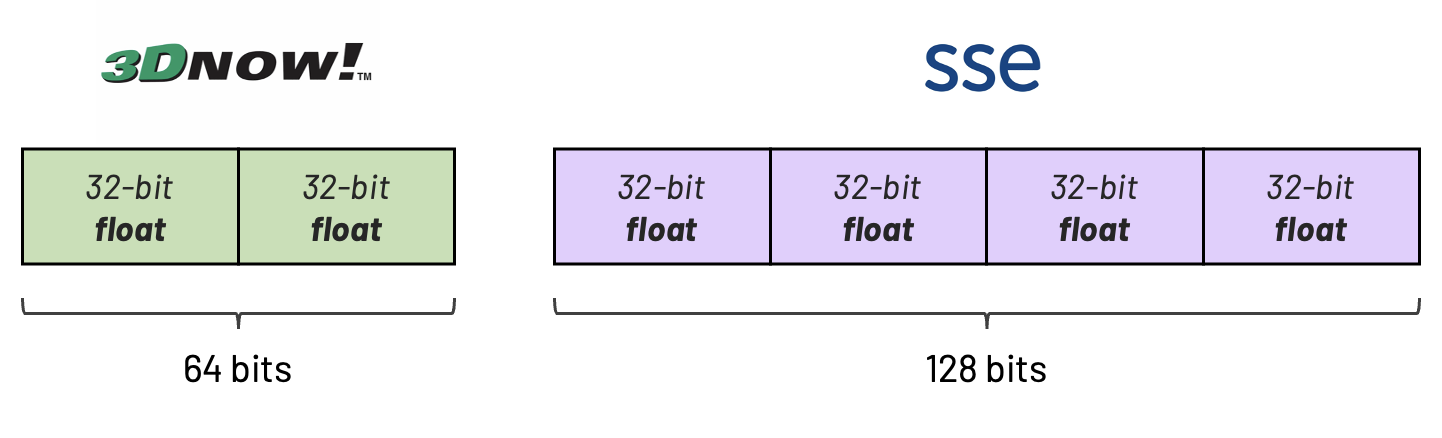
SSE's threat to 3DNow! was bigger because it did the same fundamental job: floating-point SIMD, but with a more powerful and ultimately industry-standard architecture. SSE didn't immediately make MMX obsolete because MMX was still excellent at integer SIMD, particularly for things like pixels, image processing, audio samples, and packed 8/16-bit arithmetic.
SSE gave developers a more powerful and vendor-backed floating-point SIMD architecture. And unlike 3DNow!, SSE became the long-term direction of x86 SIMD.
Why Did MMX Die Out?
So, what ultimately made the old MMX registers unnecessary? If you ask retro tech enthusiasts, most answers would point to the introduction of SSE2 by Intel in 2000. SSE2 brought exactly the thing MMX was good at (integer SIMD) into the newer XMM register architecture, while also giving programmers much wider registers.
SSE2 gives you 128-bit XMM registers and, crucially, adds extensive integer SIMD operations to the x86 architecture.
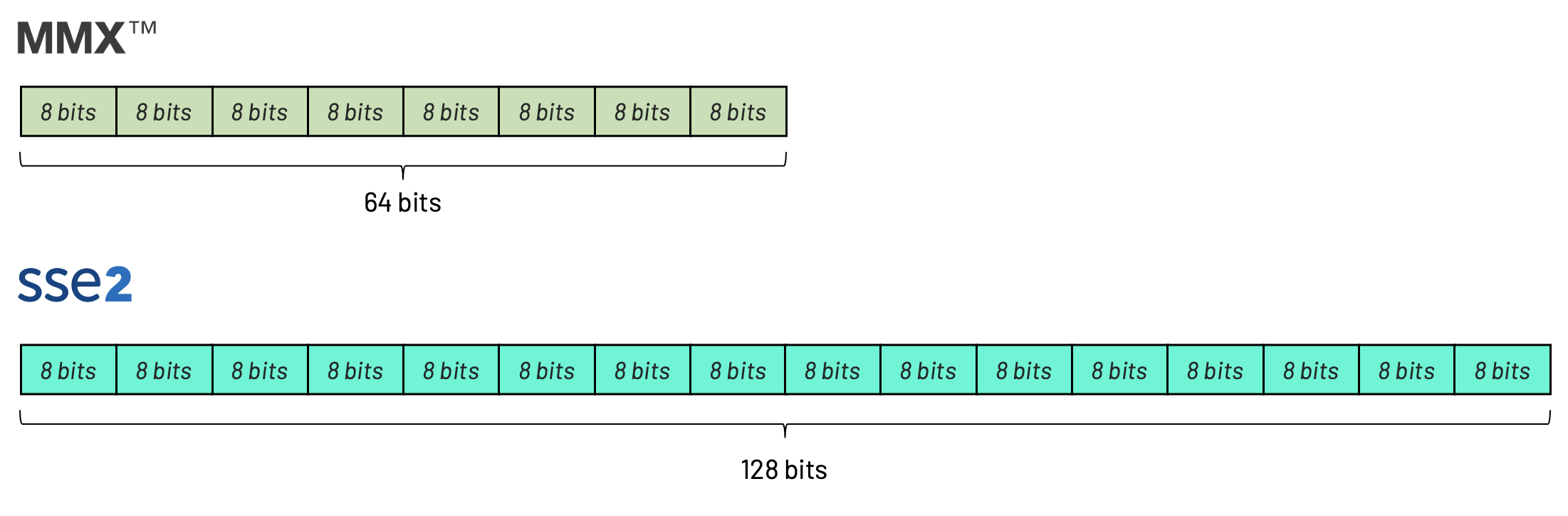
Imagine you were a game programmer in 2001.
Using the old MMX registers, you could process 8 pixels at a time:
movq    mm0, [pixels]
paddusb mm0, mm1
movq    [pixels], mm0
With SSE2, you could now process 16 pixels at a time:
movdqu  xmm0, [pixels]
paddusb xmm0, xmm1
movdqu  [pixels], xmm0
Conclusion
Hopefully, by now, you understand that MMX was not a magic "turbo button" that made the entire CPU faster. Many of my friends assumed that buying a fancy Pentium "with MMX technology" would make the entire computer (and especially their multimedia applications) faster. As you just saw, MMX simply gave the CPU new tools, but it didn't automatically make the old tools faster.
Of course, since the "Pentium with MMX" was a newer chip, it naturally came with improvements. The newer chips had 32KB of cache, while the older Pentiums only had 16KB of cache. Bigger cache alone can make your applications run faster, but that was not directly related to the presence or absence of MMX.
Looking back, MMX may seem tiny by today's standards. MMX had only eight 64-bit registers, only supported integer arithmetic, and there was no floating-point SIMD or 128-bit vectors.
MMX introduced ideas that are still with us today:
- Packed data
- Vectorized arithmetic
- Saturating operations
- Data-parallel programming
- Explicit SIMD optimizations
Later, SSE expanded the registers to 128 bits, and AVX doubled them again. Modern CPUs can process hundreds of bytes per instruction using vector extensions that all trace their lineage back to those original MMX instructions.
For many programmers in the late 1990s, MMX was the first exposure to thinking about algorithms in terms of vectors instead of individual values. Once you started seeing arrays as chunks of data that could move through the CPU together, it changed how you thought of performance-critical code.
Was the MMX a Failure?
Unlike many authors, I would not call MMX a failure. You'll see some comments claiming MMX was decent for digital signal processing (like audio and modem), but not that useful for games and renderers. For those applications, adding any MMX code meant lowering FPU performance on the graphics side, which limited the use of MMX in games.
My diplomatic answer would be that MMX was a successful technology transition, but not a particularly successful long-lived instruction set.
Even though MMX has long since disappeared from modern software, it remains an important milestone in the evolution of PC programming. It is a fascinating snapshot of an era when every CPU cycle counted.
And that's it for our quick review of MMX in old Pentium CPUs. If you have any suggestions for this article, you can yell at me on Twitter. Also, remember to visit the courses page to access my lectures on retro programming.
See you inside!